Shamblesguru Voom, also known as Chris Smith /rl is a fellow virtual teaching enthusiast, who resides in Thailand supporting the International Schools Community with his Second Life installation of the same name. I consider it a great compliment that he often stays up late to attend our Tools.Jam sessions on Tuesday mornings, at 9:30am PST. He refers to himself as the "biggest learner in the room" and often prefaces a teacher-ly comment with "alright, boys and girls..." He recently said something about how he planned to mention Tools.Jam at the Bangkok TED Talks in mid-February which was a delightful surprise and I imagined him attending and chatting about his virtual activities, but then it seems that he was actually a Presenter there!
He went prepared with a wonderful video made by another Second Life friend, Leon Turbrok, that I happened to meet on Help Island when he was brand new. I remember that Leon dove right into building, creating a line of watches and quickly grasping the finer points of virtual content creation. Clearly, he did a great job capturing Shamble's clever approach to sharing the podium with his own avatar, effectively bridging First and Second Life with his characteristic wit.
Bravo, Gentlemen! Well Done!
Video: http://vimeo.com/9430042
Doubling-clicking on it will give you a full screen view. Escape will return you to the blog view.
Storyboards: http://bit.ly/Leon-Shambles
Publish Post
Shambles' presentation at TEDx BKK 2010 from =IcaruS= on Vimeo.
20 February 2010


01 January 2010
Review: Training and Collaboration with Virtual Worlds, by Heiphetz and Woodill
 Second Life® is approaching it's 7th birthday, and what we all are wishing for (namely: broader acceptance and appreciation) has found a wonderful new supporting voice. The goal of attracting users with serious work to do has been a topic often discussed at Epoch events, and while there are several excellent books that explore both the details of using a virtual platform and the reasons why you may want to do so, none of them provide the wealth of information from actual business innovators who came to Second Life® and found profoundly positive results as those chronicled in the newly published: Training and Collaboration with Virtual Worlds, by Alex Heiphetz, Ph.D. and Gary Woodill, ED.D.
The book offers several excellent case studies as well as a balanced discussion of everything from security issues to how to bring your materials into the Second Life® environment. Clearly, the authors have been involved in solving these issues as they discuss appropriate participants, technical requirements and best practices for introductions and orientation.

I am now officially sending all who ask after supporting data for virtual world use to the Heiphetz-Woodill book, as I find it easy to read and comprehensive in it's detailed accounts of training events. Outcomes are well documented, with excellent citing of learning research and and detailed user assessments. The chapter co-written with Philippe Barreaud, lead on Michelin's effort to instruct their complex Enterprise Architecture Systems to a global community of IS employees is particularly riveting. The combined issues of far-flung teams, different cultures as well as a complex difficult topic which "had proven impossible to teach" successfully. Yet the Second Life effort was both effective and very well-received, with the post-event feedback from employees shown here. In addition, "User acceptance did not vary according to the background of culture."
This is the sort of objective examination which will help others to assess the potential of the virtual platform for their efforts and I am very pleased to see this book appear on Amazon.com and in bookstores. Thanks to the authors and their bold clients!
[Purchasing your copy via the widget on this page will help to support The Epoch Institute's Virtual Programs and allow us to continue to present Training and Education Events at out Second Life® facilities.]
16 April 2009
Summary Page with Links For Orientation Topics

Click on the highlighted words below to reach the desired information. You can return to this page at any time by clicking the SL-Start link in the upper right-hand corner of the blog
- Epoch Welcome Page: General information about Second Life™ and The Epoch Institute.
- How Does It Work? What is this "place" that exists virtually?
- Tech Specs: Will my machine work?
- How To Find Epoch in Second Life™
- Second Life™
Cheat-SheetsQuick Start: Three choices, take your pick.
01 March 2008
Where in the World is The Epoch Institute??

Here it is...your magic carpet ride straight to the Epoch Institute in Second Life. This is a Second Life URL, or SLurl. It will initiate the Second Life Browser and log you in at the class location, exactly where you want to be! http://bit.ly/EPOCH-SLurl
When you click on it , you will get a screen that looks like this map. Click on the TELEPORT NOW button in the upper righthand corner of the center white bubble to both launch the Second Life Browser on your machine and see to it that you arrive directly at The EPOCH Institute. You must already have the browser downloaded and installed in order for this to work. This allows you to bypass Help Island and arrive directly at the relatively serene Epoch Institute.
For more information, go to the Summary Page for this Orientation Blog, or use the links on the Right.
http://epochinstitute.blogspot.com/2009/04/summary-page-with-links-for-orientation.html
For more information, go to the Summary Page for this Orientation Blog, or use the links on the Right.
http://epochinstitute.blogspot.com/2009/04/summary-page-with-links-for-orientation.html

Tech Specs for Running Second Life


If you are unsure of what graphics card is on your machine, you can easily determine that before you log in, from the HELP Command in the upper left-hand corner of the Second Life® Log-In Page. The Lindens have also listed the cards which are either not supported or demonstrate known issues with the Second Life® program. Your machine may run Second Life® despite using these cards, but you might have strange and unpredictable issues with appearance and performance.


If you are trying to use a less than ideal machine to run Second Life® you may want to read this excellent post by Joel Foner. He's collected some excellent tips for minimizing the computing demands but keep in mind, a computer equipped with a good graphics card will enhance your immersive experience dramatically.
So, assuming that you are ready to log in, grab your map to your destination, and get some guidance on how to get yourself there.
Sources: Second Life® System Requirements Page, Second Life® Knowledge Base.

How Do I .... Do Things in Second Life?
 The Epoch Institute campus has a central courtyard, with two ancient trees and extensive landscaping. Second Life is entirely created by platform users and much of it is quite beautiful. You will be represented by your avatar as you travel about and interact with other visitors.
Navigating
Knowing how to move around and interact through your avatar will help you to feel more comfortable during your meeting or class. You can see here the standard vantage point which you have of your avatar once "in-world." This is your point-of-view, or POV, sometimes referred to as your camera. You travel about, slightly behind your avatar, viewing his or her actions as well as the surrounding setting.
Know Your Arrow Keys and ALT
Your avatar moves in response to the arrow keys on your computer. The Second Life "window" must be active, just as you activate any other program on your computer. So you may need to click on the ground to activate the window, then use the arrow keys to move about. The UP arrow key moves your avatar forward, DOWN will put you in reverse and the LEFT and RIGHT arrow keys will move you well, left and right. If you wish to shift about and see the front of your avatar, use the ALT key: ALT+ LEFT or ALT+RIGHT arrow key to shift your view. ALT+ UP will pan your view in close or or ALT+DOWN moves your view farther away so that you can see more. Adding the ALT key to the mouse will also give you similar options but this can be awkward to control, and I reccommend that you use your arrow keys initially.

Right-Click to Sit Here
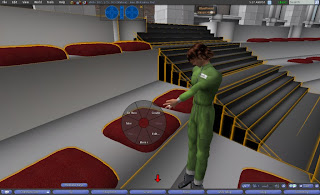
Once you can move about and see yourself, you will want to be able to make your avatar do things and for this you must animate yourself. A RIGHT-CLICK of your mouse anywhere on your avatar activates the PIE CHART and this offers you several options, the most important being SIT HERE. You will use SIT HERE often. Once you sit, the animation embedded in the chair determines how you look as you sit. You cannot affect how you sit but you can choose to sit in a different chair that may possibly have a different pose in it. Again, first you chose your spot, RIGHT-CLICK with your mouse, choose SIT HERE from the pie chart and there you are, settled to have a chat or listen to a lecture. You will have the chance to try all of this during your orientation session. If you are concerned about remembering all of this, we've collected some helpful reminders here: http://bit.ly/Epoch-QS .
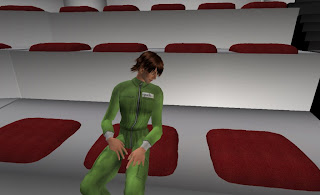
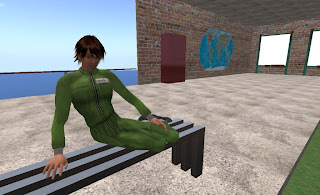
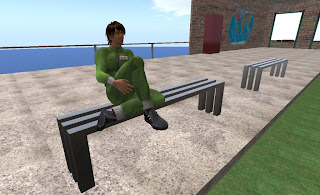 The poses installed in the seat will determine how you appear as you sit.
 What is Second Life Like?
The video below will give some sense of what an avatar looks like and how it moves. Many people spend a good deal of time customizing their avatar, however we can bring you "in-world" with a pre-existing avatar directly to our campus. We want you to enjoy your class and minimize the time that you must invest in order to be able to participate. After watching the video, continue with the your orientation by going to this page: http://epochinstitute.blogspot.com/2008/03/tech-specs-for-running-second-life.html
Many thanks to Phaylan for this wonderful machinima.
Many thanks to Phaylan for this wonderful machinima.
Subscribe to:
Posts (Atom)